Python while Loop
 Python3 Loop Statements
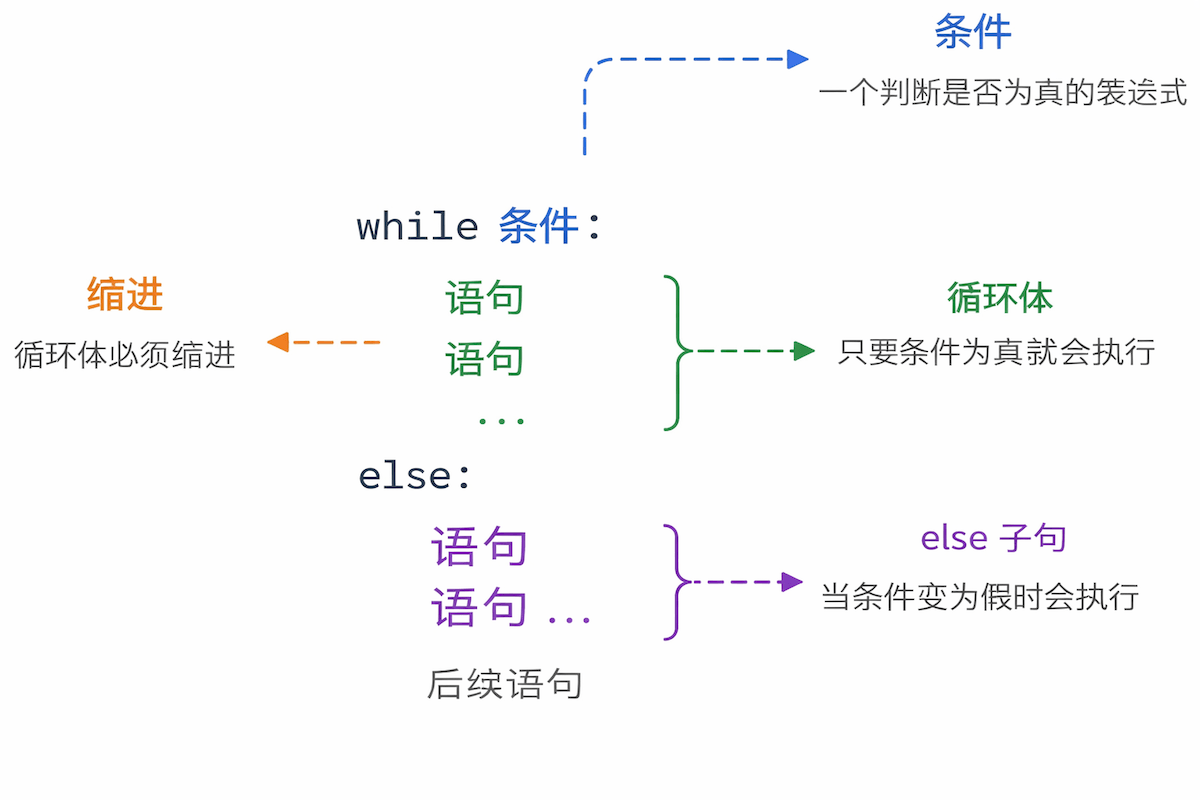
while is a conditional loop statement in Python. As long as the condition is True, the loop body continues to execute.
Unlike for, the while loop is more suitable for scenarios where the number of iterations is uncertain and where you need to exit based on a condition.
Word Meaning: while means “as long as”, indicating that execution continues as long as the condition is true.
Basic Syntax and Parameters
Section titled “Basic Syntax and Parameters”Syntax Format
Section titled “Syntax Format”Syntax Description
Section titled “Syntax Description”- condition: The conditional expression evaluated before each loop iteration begins.
- Execution Logic: When True, the loop body executes, then the condition is re-evaluated.
- Exit Condition: The loop exits when the condition becomes False.
else Clause
Section titled “else Clause”- Optional: Similar to for, while can also have an else.
- Execution Timing: Executed when the condition becomes False (normal exit).
Examples
Section titled “Examples”Example 1: Basic Usage
Section titled “Example 1: Basic Usage”Example
Section titled “Example”Expected Output:
Code Explanation:
- The loop continues while count < 5.
- count increases by 1 each iteration.
- When count = 5, the condition is False, and the loop exits.
Example 2: User Input Validation
Section titled “Example 2: User Input Validation”Example
Section titled “Example”Expected Output:
The while loop is commonly used in scenarios requiring repetition until a condition is met.
Example 3: Calculating Factorials
Section titled “Example 3: Calculating Factorials”Example
Section titled “Example”Expected Output:
When using while loops for numerical calculations, be careful to avoid infinite loops.
Example 4: while-else Structure
Section titled “Example 4: while-else Structure”Example
Section titled “Example”Expected Output:
The else clause of while-else does not execute when the loop is terminated by break.
Example 5: Infinite Loop and Exit
Section titled “Example 5: Infinite Loop and Exit”Example
Section titled “Example”Infinite loops combined with break can implement complex control flows.
Expected Output: