Python Web Scraping – BeautifulSoup
Python web scraping refers to the process of automatically extracting information from the internet by writing Python programs.
The basic process of web scraping typically includes sending HTTP requests to obtain web page content, parsing the web page and extracting data, and then storing the data.
Python’s rich ecosystem makes it a popular language for developing web scrapers, especially due to its powerful library support.
Generally, the web scraping process can be divided into the following steps:
- Send HTTP Requests: The scraper obtains the HTML page from the target website via HTTP requests. Common libraries include
requests. - Parse HTML Content: After obtaining the HTML page, the scraper needs to parse the content and extract data. Common libraries include
BeautifulSoup,lxml,Scrapy, etc. - Extract Data: Locate HTML elements (such as tags, attributes, class names, etc.) to extract the required data.
- Store Data: Store the extracted data in databases, CSV files, JSON files, and other formats for subsequent use or analysis.
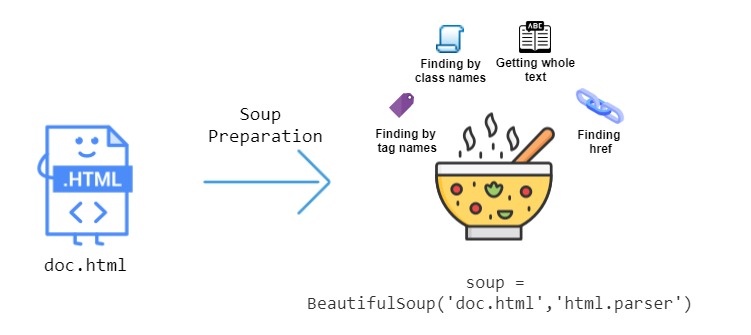
This chapter mainly introduces BeautifulSoup, which is a Python library for parsing HTML and XML documents, capable of extracting data from web pages, commonly used for web scraping and data mining.
BeautifulSoup
Section titled “BeautifulSoup”BeautifulSoup is a Python library for extracting data from web pages, particularly suitable for parsing HTML and XML files.
BeautifulSoup can extract and manipulate content from web pages by providing a simple API, making it very suitable for web scraping and data extraction tasks.
Installing BeautifulSoup
Section titled “Installing BeautifulSoup”To use BeautifulSoup, you need to install beautifulsoup4 and lxml or html.parser (an HTML parser).
You can use pip to install these dependencies:
If you don’t have lxml, you can use Python’s built-in html.parser as the parser.
Basic Usage
Section titled “Basic Usage”BeautifulSoup is used to parse HTML or XML data and provides methods for navigating, searching, and modifying the parse tree.
Common operations of BeautifulSoup include finding tags, getting tag attributes, extracting text, etc.
To use BeautifulSoup, you need to import BeautifulSoup first and load the HTML page into a BeautifulSoup object.
Typically, you will first use a scraping library (such as requests) to get the web page content:
Example
Section titled “Example”Get the web page title:
Example
Section titled “Example”Executing the above code outputs the title:
Chinese Encoding Issues
Section titled “Chinese Encoding Issues”When using the requests library to scrape Chinese web pages, you may encounter encoding issues that prevent Chinese content from being displayed correctly. To ensure correct scraping and display of Chinese web pages, you typically need to handle the web page’s character encoding.
Auto-detecting encoding: requests usually automatically infers the web page’s encoding based on the Content-Type in the response headers, but sometimes it may be inaccurate. In such cases, you can use chardet to auto-detect the encoding.
Example
Section titled “Example”Executing the above code outputs:
If you know the web page’s encoding (e.g., utf-8 or gbk), you can directly set response.encoding:
Finding Tags
Section titled “Finding Tags”BeautifulSoup provides various methods to find tags in web pages. The most commonly used ones include find() and find_all().
find()returns the first matching tagfind_all()returns all matching tags
Example
Section titled “Example”The output result is similar to the following:
Getting Tag Text
Section titled “Getting Tag Text”Through the get_text() method, you can extract the text content in a tag:
Example
Section titled “Example”The output result is similar to the following:
Finding Child Tags and Parent Tags
Section titled “Finding Child Tags and Parent Tags”You can access a tag’s parent tag and child tags through the parent and children attributes:
Example
Section titled “Example”The output result is similar to the following:
Finding Tags with Specific Attributes
Section titled “Finding Tags with Specific Attributes”You can find tags with specific attributes by passing attributes.
For example, find all div tags with the class name example-class:
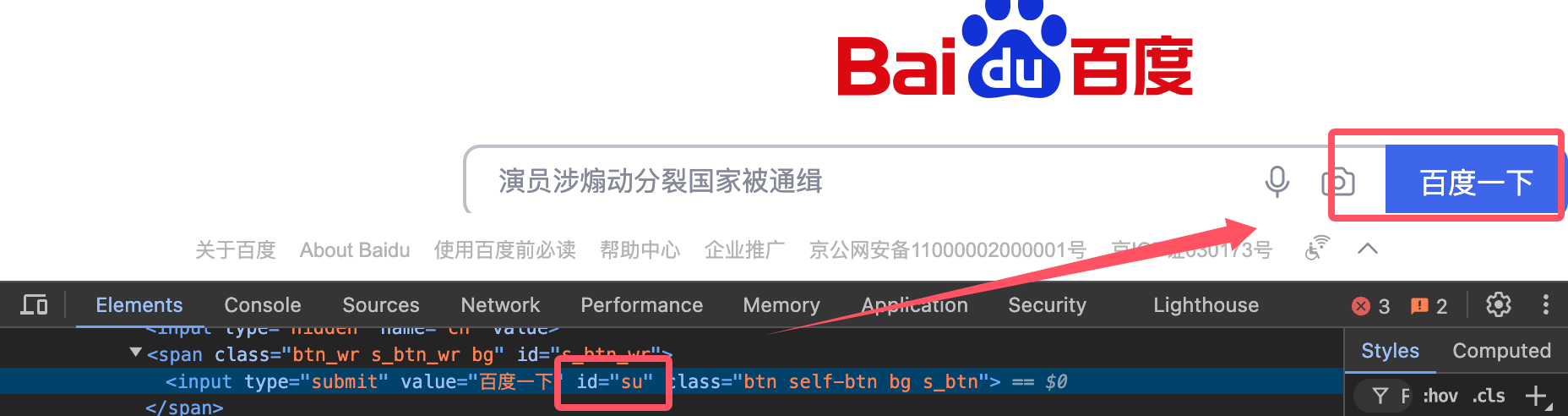
Get the search button with id su:
Example
Section titled “Example”The output result is:
Advanced Usage
Section titled “Advanced Usage”CSS Selectors
Section titled “CSS Selectors”BeautifulSoup also supports finding tags through CSS selectors.
The select() method allows using jQuery-like selector syntax to find tags:
Handling Nested Tags
Section titled “Handling Nested Tags”BeautifulSoup supports deeply nested HTML structures. You can handle these structures by recursively finding child tags:
Modifying Web Page Content
Section titled “Modifying Web Page Content”BeautifulSoup allows you to modify HTML content.
You can modify tag attributes, text, or delete tags:
Example
Section titled “Example”Converting to String
Section titled “Converting to String”You can convert the parsed BeautifulSoup object back to an HTML string:
BeautifulSoup Attributes and Methods
Section titled “BeautifulSoup Attributes and Methods”The following are commonly used attributes and methods in BeautifulSoup:
| Method/Attribute | Description | Example |
|---|---|---|
BeautifulSoup() |
Parse HTML or XML documents and return a BeautifulSoup object. | soup = BeautifulSoup(html_doc, 'html.parser') |
.prettify() |
Format and beautify document content, generating structured strings. | print(soup.prettify()) |
.find() |
Find the first matching tag. | tag = soup.find('a') |
.find_all() |
Find all matching tags, returning a list. | tags = soup.find_all('a') |
.find_all_next() |
Find all tags after the current tag that match the criteria. | tags = soup.find('div').find_all_next('p') |
.find_all_previous() |
Find all tags before the current tag that match the criteria. | tags = soup.find('div').find_all_previous('p') |
.find_parent() |
Return the parent tag of the current tag. | parent = tag.find_parent() |
.find_all_parents() |
Find all parent tags of the current tag. | parents = tag.find_all_parents() |
.find_next_sibling() |
Find the next sibling tag of the current tag. | next_sibling = tag.find_next_sibling() |
.find_previous_sibling() |
Find the previous sibling tag of the current tag. | prev_sibling = tag.find_previous_sibling() |
.parent |
Get the parent tag of the current tag. | parent = tag.parent |
.next_sibling |
Get the next sibling tag of the current tag. | next_sibling = tag.next_sibling |
.previous_sibling |
Get the previous sibling tag of the current tag. | prev_sibling = tag.previous_sibling |
.get_text() |
Extract the text content within a tag, ignoring all HTML tags. | text = tag.get_text() |
.attrs |
Return all attributes of a tag, represented as a dictionary. | href = tag.attrs['href'] |
.string |
Get the string content within a tag. | string_content = tag.string |
.name |
Return the name of the tag. | tag_name = tag.name |
.contents |
Return all child elements of a tag, as a list. | children = tag.contents |
.descendants |
Return all descendant elements of a tag, as a generator. | for child in tag.descendants: print(child) |
.parent |
Get the parent tag of the current tag. | parent = tag.parent |
.previous_element |
Get the previous element of the current tag (excluding text). | prev_elem = tag.previous_element |
.next_element |
Get the next element of the current tag (excluding text). | next_elem = tag.next_element |
.decompose() |
Remove the current tag and its content from the tree. | tag.decompose() |
.unwrap() |
Remove the tag itself, keeping only its child content. | tag.unwrap() |
.insert() |
Insert a new tag or text into the tag. | tag.insert(0, new_tag) |
.insert_before() |
Insert a new tag before the current tag. | tag.insert_before(new_tag) |
.insert_after() |
Insert a new tag after the current tag. | tag.insert_after(new_tag) |
.extract() |
Remove the tag and return it. | extracted_tag = tag.extract() |
.replace_with() |
Replace the current tag and its content. | tag.replace_with(new_tag) |
.has_attr() |
Check if the tag has a specified attribute. | if tag.has_attr('href'): |
.get() |
Get the value of a specified attribute. | href = tag.get('href') |
.clear() |
Clear all content of the tag. | tag.clear() |
.encode() |
Encode the tag content as a byte stream. | encoded = tag.encode() |
.is_empty_element |
Check if the tag is an empty element (e.g., <br>, <img>, etc.). |
if tag.is_empty_element: |
.is_ancestor_of() |
Check if the current tag is an ancestor of the specified tag. | if tag.is_ancestor_of(another_tag): |
.is_descendant_of() |
Check if the current tag is a descendant of the specified tag. | if tag.is_descendant_of(another_tag): |
Other Attributes
Section titled “Other Attributes”| Method/Attribute | Description | Example |
|---|---|---|
.style |
Get the inline style of the tag. | style = tag['style'] |
.id |
Get the id attribute of the tag. |
id = tag['id'] |
.class_ |
Get the class attribute of the tag. |
class_name = tag['class'] |
.string |
Get the string content within the tag, ignoring other tags. | content = tag.string |
.parent |
Get the parent element of the tag. | parent = tag.parent |
Others
Section titled “Others”| Method/Attribute | Description | Example |
|---|---|---|
find_all(string) |
Use strings to find matching tags. | tag = soup.find_all('div', class_='container') |
find_all(id) |
Find tags with the specified id. |
tag = soup.find_all(id='main') |
find_all(attrs) |
Find tags with specified attributes. | tag = soup.find_all(attrs={"href": "http://example.com"}) |