Python3 Namespace and Scope
Namespace
Section titled “Namespace”First, let’s look at a passage from the official documentation:
A namespace is a mapping from names to objects. Most namespaces are currently implemented as Python dictionaries.
A namespace is a mapping from names to objects, and most namespaces are implemented through Python dictionaries.
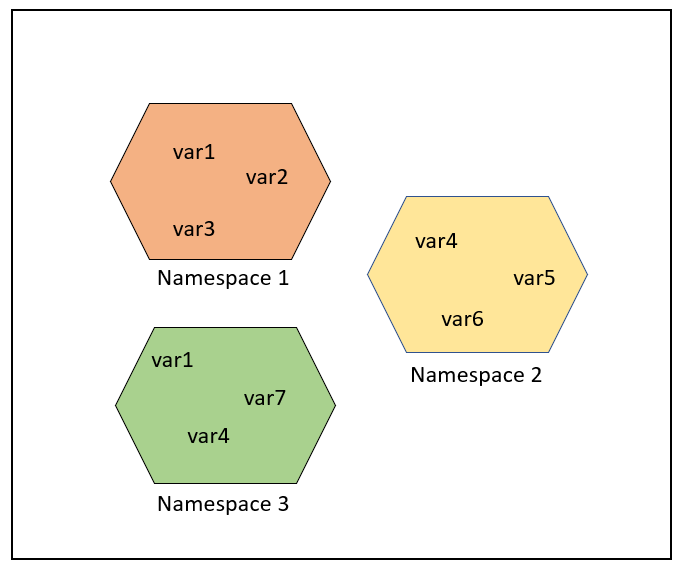
Namespaces provide a way to avoid name conflicts in projects. Each namespace is independent and unrelated, so there cannot be duplicate names within a single namespace, but different namespaces can have duplicate names without any impact.
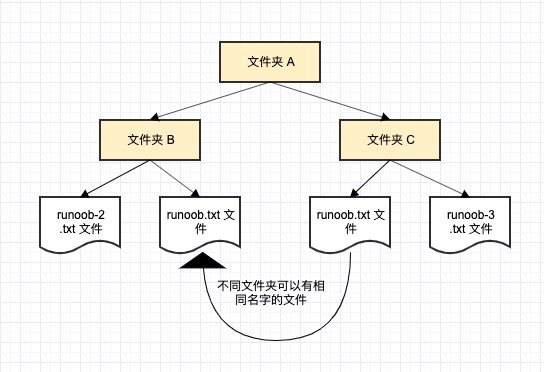
Let’s take an example from a computer system: a folder (directory) can contain multiple folders. Each folder cannot have files with the same name, but files in different folders can have the same name.
Generally, there are three types of namespaces:
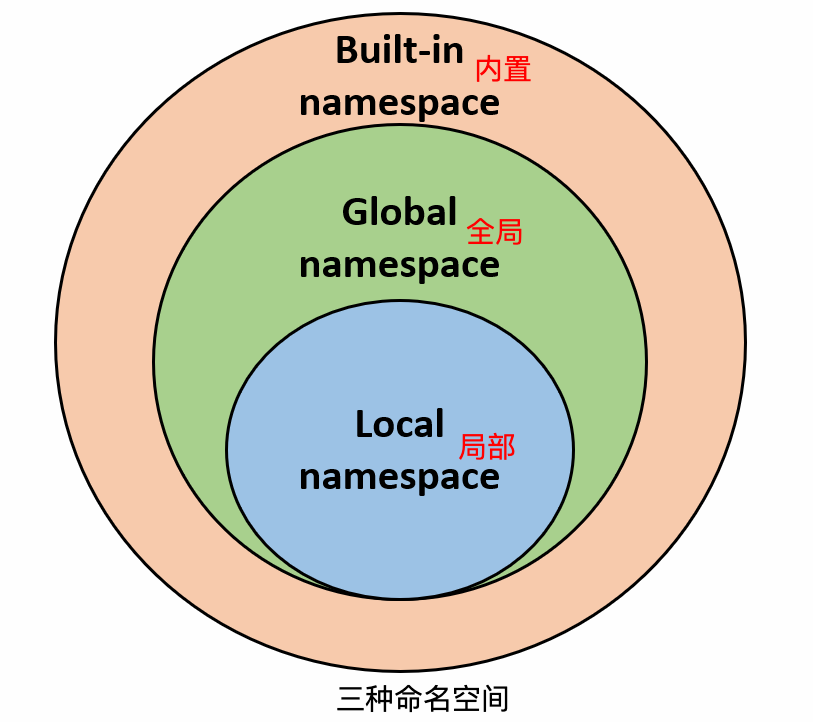
- Built-in names, names built into the Python language, such as function names like abs, char, and exception names like BaseException, Exception, etc.
- Global names, names defined in a module, recording the module’s variables, including functions, classes, other imported modules, and module-level variables and constants.
- Local names, names defined in a function, recording the function’s variables, including function parameters and locally defined variables. (Also those defined in classes)
Namespace lookup order:
Suppose we want to use the variable runoob, then Python’s search order is: local namespace -> global namespace -> built-in namespace.
If the variable runoob cannot be found, it will give up the search and raise a NameError exception:
Namespace lifecycle:
The lifecycle of a namespace depends on the scope of the object. If the object execution is complete, the lifecycle of that namespace ends.
Therefore, we cannot access objects from an inner namespace from an outer namespace.
Example
Section titled “Example”As shown in the following diagram, the same object name can exist in multiple namespaces.
A scope is a textual region of a Python program where a namespace is directly accessible. “Directly accessible” here means that an unqualified reference to a name attempts to find the name in the namespace.
A scope is a textual region of a Python program where a namespace is directly accessible.
In a Python program, directly accessing a variable will search from the innermost to the outermost scope until it is found, otherwise an undefined error will be reported.
In Python, program variables are not accessible from everywhere. Access permissions are determined by where the variable is assigned.
The scope of a variable determines which part of the program can access which specific variable name.
Python has 4 types of scopes:
There are four scopes:
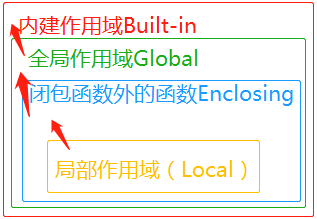
- L (Local): The innermost layer, containing local variables, such as inside a function/method.
- E (Enclosing): Contains non-local and non-global variables. For example, with two nested functions, if a function (or class) A contains a function B, then for names in B, the scope in A is nonlocal.
- G (Global): The outermost layer of the current script, such as the global variables of the current module.
- B (Built-in): Contains built-in variables/keywords, searched last.
LEGB Rule (Local, Enclosing, Global, Built-in): The order in which Python looks up variables is: L –> E –> G –> B.
- Local: The local scope of the current function.
- Enclosing: The scope of the outer function containing the current function (if there are nested functions).
- Global: The global scope of the current module.
- Built-in: Python’s built-in scope.
If not found locally, it will search in the enclosing scope (e.g., closures), then in the global scope if not found, and finally in the built-in scope.
The built-in scope is implemented through a standard module called builtin, but this variable name itself is not placed in the built-in scope, so you must import this file to use it. In Python 3.0, you can use the following code to see what variables are predefined:
In Python, only modules, classes, and functions (def, lambda) introduce new scopes. Other code blocks (such as if/elif/else/, try/except, for/while, etc.) do not introduce new scopes. This means that variables defined inside these statements can also be accessed from outside, as shown in the following code:
In the example, the msg variable is defined inside the if statement block, but it can still be accessed from outside.
If msg is defined inside a function, it becomes a local variable and cannot be accessed from outside:
The error message indicates that msg_inner is undefined and cannot be used because it is a local variable that can only be used within the function.
Global Variables and Local Variables
Section titled “Global Variables and Local Variables”Variables defined inside a function have a local scope, while those defined outside a function have a global scope.
Local variables can only be accessed within the function where they are declared, while global variables can be accessed throughout the entire program.
Variables declared inside a function are only effective within the function’s internal scope. When the function is called, these internal variables are added to the function’s internal scope and do not affect variables with the same name outside the function, as shown in the following example:
Example (Python 3.0+)
Section titled “Example (Python 3.0+)”Output of the above example:
- Global Variables: Variables defined outside a function can be accessed throughout the entire file. Variables defined outside a function are visible to all functions, unless a local variable with the same name is defined inside the function.
Example
Section titled “Example”- Local Variables: Variables defined inside a function are only effective within the function and cannot be accessed from outside. Local variables have higher priority than global variables, so if a local variable and a global variable have the same name, the function will use the local variable.
Example
Section titled “Example”The global and nonlocal Keywords
Section titled “The global and nonlocal Keywords”When an inner scope wants to modify variables in an outer scope, the global and nonlocal keywords are used.
The following example modifies the global variable num:
Example (Python 3.0+)
Section titled “Example (Python 3.0+)”Output of the above example:
If you want to modify variables in a nested scope (enclosing scope, outer non-global scope), you need the nonlocal keyword, as shown in the following example:
Example (Python 3.0+)
Section titled “Example (Python 3.0+)”Output of the above example:
There is also a special case. Suppose the following code is run:
Example (Python 3.0+)
Section titled “Example (Python 3.0+)”The above program execution produces the following error message:
The error message is a local scope reference error, because a in the test function uses the local one, which is undefined and cannot be modified.
Modify a to be a global variable:
Example
Section titled “Example”The execution output is:
You can also pass it through function parameters:
Example (Python 3.0+)
Section titled “Example (Python 3.0+)”The execution output is:
Summary
Section titled “Summary”- Global variables are defined outside a function and can be accessed throughout the entire file.
- Local variables are defined inside a function and can only be accessed within the function.
- Use
globalto modify global variables within a function. - Use
nonlocalto modify variables of the outer function within a nested function.