Python3 Dictionaries
A dictionary is another mutable container model that can store objects of any type.
Each key-value key=>value pair in a dictionary is separated by a colon : and each pair is separated by a comma (,). The entire dictionary is enclosed in curly braces {}. The format is as follows:
Note: Since dict is a Python keyword and built-in function, it is not recommended to name a variable dict.
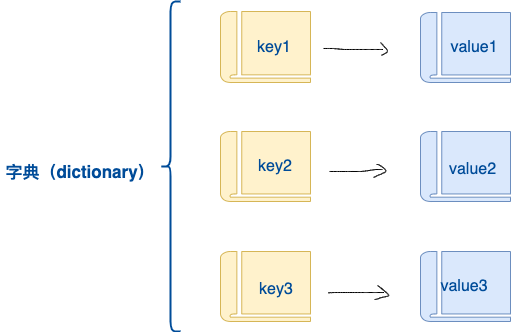
Keys must be unique, but values do not.
Values can be of any data type, but keys must be immutable, such as strings or numbers.
A simple dictionary example:
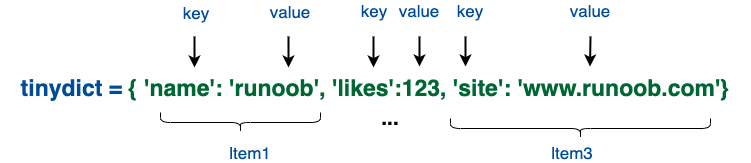
You can also create dictionaries like this:
Creating an Empty Dictionary
Section titled “Creating an Empty Dictionary”Use curly braces { } to create an empty dictionary:
Example
Section titled “Example”Output of the above example:
Use the built-in function dict() to create a dictionary:
Example
Section titled “Example”Output of the above example:
Accessing Dictionary Values
Section titled “Accessing Dictionary Values”Put the corresponding key in square brackets, as shown in the example below:
Example
Section titled “Example”Output of the above example:
If you access data using a key that does not exist in the dictionary, an error will be thrown as follows:
Example
Section titled “Example”Output of the above example:
Modifying a Dictionary
Section titled “Modifying a Dictionary”The way to add new content to a dictionary is to add new key/value pairs. Modifying or deleting existing key/value pairs is shown in the example below:
Example
Section titled “Example”Output of the above example:
Deleting Dictionary Elements
Section titled “Deleting Dictionary Elements”You can delete individual elements or clear the entire dictionary. Clearing requires only a single operation.
Explicitly delete a dictionary using the del command, as shown in the example below:
Example
Section titled “Example”But this will raise an exception because the dictionary no longer exists after executing the del operation:
Note: The del() method will also be discussed later.
Dictionary Key Characteristics
Section titled “Dictionary Key Characteristics”Dictionary values can be any Python object, whether standard objects or user-defined ones, but keys cannot.
Two important points to remember:
- The same key cannot appear twice. If the same key is assigned twice during creation, the later value will be remembered, as shown in the example below:
Example
Section titled “Example”Output of the above example:
- Keys must be immutable, so you can use numbers, strings, or tuples, but not lists, as shown in the example below:
Example
Section titled “Example”Output of the above example:
Dictionary Built-in Functions & Methods
Section titled “Dictionary Built-in Functions & Methods”Python dictionaries include the following built-in functions:
| No. | Function & Description | Example |
|---|---|---|
| 1 | len(dict) Counts the number of dictionary elements, i.e., the total number of keys. |
|
| 2 | str(dict) Outputs the dictionary as a printable string representation. |
|
| 3 | type(variable) Returns the type of the input variable. If the variable is a dictionary, it returns the dictionary type. |
|
Python dictionaries include the following built-in methods:
| No. | Function & Description |
|---|---|
| 1 | dict.clear() Deletes all elements in the dictionary |
| 2 | dict.copy() Returns a shallow copy of the dictionary |
| 3 | dict.fromkeys() Creates a new dictionary using elements from seq as keys and val as the initial value for all keys |
| 4 | dict.get(key, default=None) Returns the value of the specified key. If the key is not in the dictionary, returns the default value |
| 5 | key in dict Returns true if the key is in the dictionary, otherwise false |
| 6 | dict.items() Returns a view object as a list |
| 7 | dict.keys() Returns a view object |
| 8 | dict.setdefault(key, default=None) Similar to get(), but if the key does not exist in the dictionary, it adds the key and sets the value to default |
| 9 | dict.update(dict2) Updates the key/value pairs from dict2 into dict |
| 10 | dict.values() Returns a view object |
| 11 | dict.pop(key[,default]) Deletes the value corresponding to the dictionary key and returns the deleted value. |
| 12 | dict.popitem() Returns and deletes the last key-value pair in the dictionary. |