Python3 Tuples
Python tuples are similar to lists, but the difference is that tuple elements cannot be modified.
Tuples use parentheses ( ), while lists use square brackets [ ].
Creating a tuple is simple — just add elements inside parentheses and separate them with commas.
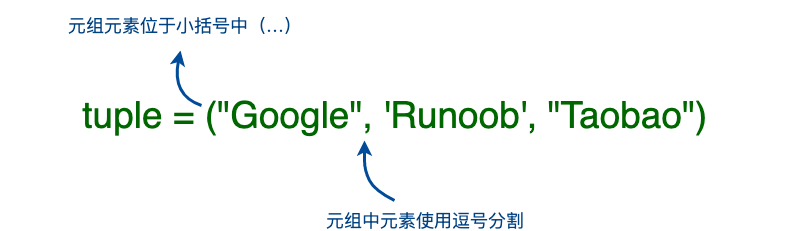
Example (Python 3.0+)
Section titled “Example (Python 3.0+)”Creating an empty tuple:
When a tuple contains only one element, you need to add a comma after the element, otherwise the parentheses will be treated as an operator:
Example (Python 3.0+)
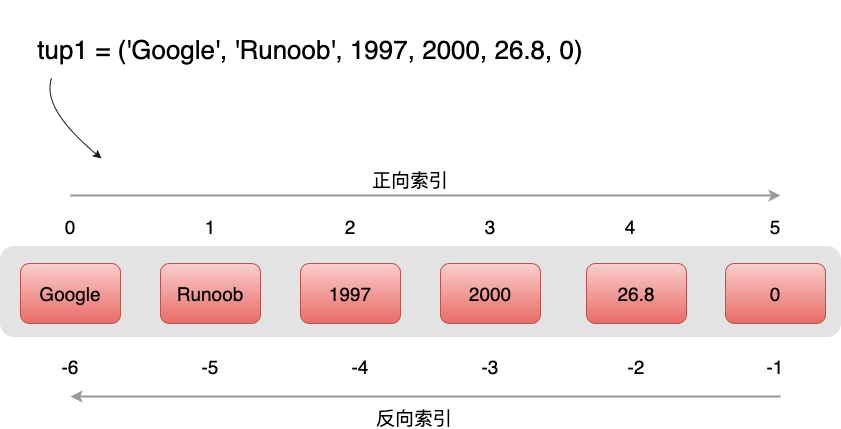
Section titled “Example (Python 3.0+)”Tuples are similar to strings: subscript indices start at 0, and they can be sliced and combined.
Accessing Tuples
Section titled “Accessing Tuples”Tuples can be accessed using subscript indices, as shown in the example below:
Example (Python 3.0+)
Section titled “Example (Python 3.0+)”Output of the above example:
Modifying Tuples
Section titled “Modifying Tuples”Tuple element values cannot be modified, but we can concatenate and combine tuples, as shown in the example below:
Example (Python 3.0+)
Section titled “Example (Python 3.0+)”Output of the above example:
Deleting Tuples
Section titled “Deleting Tuples”Tuple element values cannot be deleted, but we can use the del statement to delete the entire tuple, as shown in the example below:
Example (Python 3.0+)
Section titled “Example (Python 3.0+)”After the tuple is deleted, printing the variable will raise an exception, with output as shown below:
Tuple Operators
Section titled “Tuple Operators”Like strings, tuples can be operated on using +, += and * signs. This means they can be combined and copied, and the operation will produce a new tuple.
| Python Expression | Result | Description |
|---|---|---|
|
3 | Count elements |
|
(1, 2, 3, 4, 5, 6) | Concatenation. c is a new tuple containing all elements from a and b. |
|
(1, 2, 3, 4, 5, 6) | Concatenation. a becomes a new tuple containing all elements from a and b. |
|
('Hi!', 'Hi!', 'Hi!', 'Hi!') | Repetition |
|
True | Element exists |
|
1 2 3 | Iteration |
Tuple Indexing and Slicing
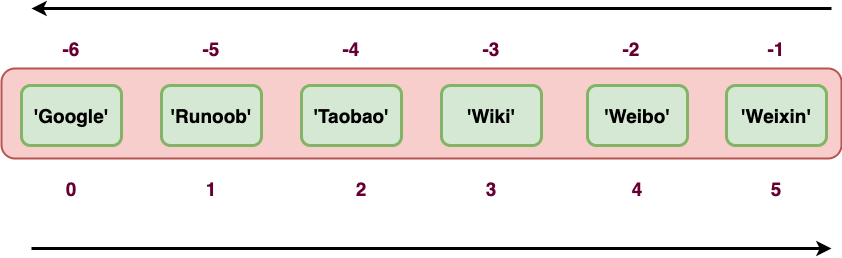
Section titled “Tuple Indexing and Slicing”Since a tuple is also a sequence, we can access elements at specific positions in a tuple and slice a range of elements, as shown below:
Tuple:
| Python Expression | Result | Description |
| tup[1] | ‘Runoob’ | Read the second element |
| tup[-2] | ‘Weibo’ | Reverse read, read the second-to-last element |
| tup[1:] | (‘Runoob’, ‘Taobao’, ‘Wiki’, ‘Weibo’, ‘Weixin’) | Slice elements, all elements starting from the second. |
| tup[1:4] | (‘Runoob’, ‘Taobao’, ‘Wiki’) | Slice elements, from the second to the fourth element (index 3). |
Running example:
Example
Section titled “Example”Tuple Built-in Functions
Section titled “Tuple Built-in Functions”Python tuples include the following built-in functions:
| No. | Method & Description | Example |
|---|---|---|
| 1 | len(tuple) Counts the number of tuple elements. |
|
| 2 | max(tuple) Returns the maximum value of tuple elements. |
|
| 3 | min(tuple) Returns the minimum value of tuple elements. |
|
| 4 | tuple(iterable) Converts an iterable series to a tuple. |
|
On Tuples Being Immutable
Section titled “On Tuples Being Immutable”The immutability of tuples means that the content of the memory the tuple points to cannot be changed.
From the above example, we can see that the reassigned tuple tup is bound to a new object, not modifying the original object.