Python 爬虫 – BeautifulSoup
Python 爬虫(Web Scraping)是指通过编写 Python 程序从互联网上自动提取信息的过程。
爬虫的基本流程通常包括发送 HTTP 请求获取网页内容、解析网页并提取数据,然后存储数据。
Python 的丰富生态使其成为开发爬虫的热门语言,特别是由于其强大的库支持。
一般来说,爬虫的流程可以分为以下几个步骤:
- 发送 HTTP 请求:爬虫通过 HTTP 请求从目标网站获取 HTML 页面,常用的库包括
requests。 - 解析 HTML 内容:获取 HTML 页面后,爬虫需要解析内容并提取数据,常用的库有
BeautifulSoup、lxml、Scrapy等。 - 提取数据:通过定位 HTML 元素(如标签、属性、类名等)来提取所需的数据。
- 存储数据:将提取的数据存储到数据库、CSV 文件、JSON 文件等格式中,以便后续使用或分析。
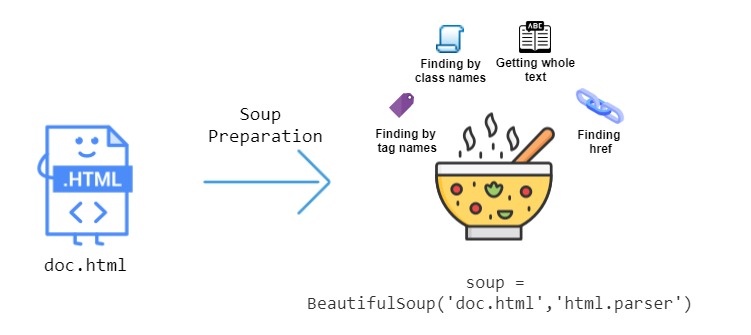
本章节主要介绍 BeautifulSoup,它是一个用于解析 HTML 和 XML 文档的 Python 库,能够从网页中提取数据,常用于网页抓取和数据挖掘。
BeautifulSoup
Section titled “BeautifulSoup”BeautifulSoup 是一个用于从网页中提取数据的 Python 库,特别适用于解析 HTML 和 XML 文件。
BeautifulSoup 能够通过提供简单的 API 来提取和操作网页中的内容,非常适合用于网页抓取和数据提取的任务。
安装 BeautifulSoup
Section titled “安装 BeautifulSoup”要使用 BeautifulSoup,需要安装 beautifulsoup4 和 lxml 或 html.parser(一个 HTML 解析器)。
我们可以使用 pip 来安装这些依赖:
如果你没有 lxml,可以使用 Python 内置的 html.parser 作为解析器。
BeautifulSoup 用于解析 HTML 或 XML 数据,并提供了一些方法来导航、搜索和修改解析树。
BeautifulSoup 常见的操作包括查找标签、获取标签属性、提取文本等。
要使用 BeautifulSoup,需要先导入 BeautifulSoup,并将 HTML 页面加载到 BeautifulSoup 对象中。
通常,你会先用爬虫库(如 requests)获取网页内容:
获取网页标题:
执行以上代码,输出标题为:
中文乱码问题
Section titled “中文乱码问题”使用 requests 库抓取中文网页时,可能会遇到编码问题,导致中文内容无法正确显示,为了确保能够正确抓取并显示中文网页,通常需要处理网页的字符编码。
自动检测编码 requests 通常会自动根据响应头中的 Content-Type 来推测网页的编码,但有时可能不准确,此时可以使用 chardet 来自动检测编码。
执行以上代码,输出为:
如果你知道网页的编码(例如 utf-8 或 gbk),可以直接设置 response.encoding:
BeautifulSoup 提供了多种方法来查找网页中的标签,最常用的包括 find() 和 find_all()。
find()返回第一个匹配的标签find_all()返回所有匹配的标签
输出结果类似如下:
获取标签的文本
Section titled “获取标签的文本”通过 get_text() 方法,你可以提取标签中的文本内容:
输出结果类似如下:
查找子标签和父标签
Section titled “查找子标签和父标签”你可以通过 parent 和 children 属性访问标签的父标签和子标签:
输出结果类似如下:
查找具有特定属性的标签
Section titled “查找具有特定属性的标签”你可以通过传递属性来查找具有特定属性的标签。
例如,查找类名为 example-class 的所有 div 标签:
获取搜索按钮,id 为 su :
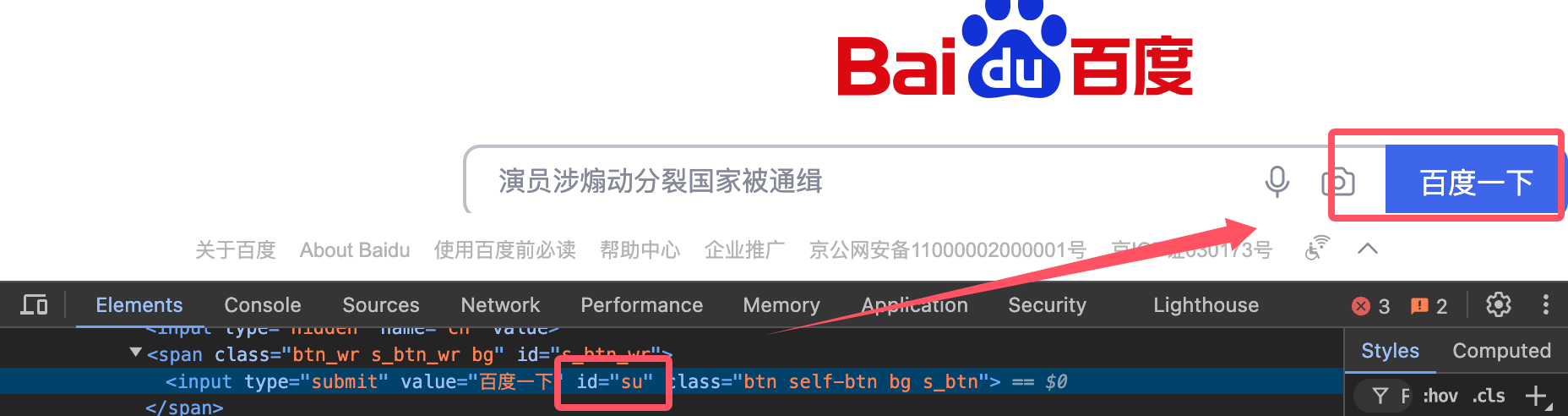
输出结果为:
CSS 选择器
Section titled “CSS 选择器”BeautifulSoup 也支持通过 CSS 选择器来查找标签。
select() 方法允许使用类似 jQuery 的选择器语法来查找标签:
处理嵌套标签
Section titled “处理嵌套标签”BeautifulSoup 支持深度嵌套的 HTML 结构,你可以通过递归查找子标签来处理这些结构:
修改网页内容
Section titled “修改网页内容”BeautifulSoup 允许你修改 HTML 内容。
我们可以修改标签的属性、文本或删除标签:
转换为字符串
Section titled “转换为字符串”你可以将解析的 BeautifulSoup 对象转换回 HTML 字符串:
BeautifulSoup 属性与方法
Section titled “BeautifulSoup 属性与方法”以下是 BeautifulSoup 中常用的属性和方法:
| 方法/属性 | 描述 | 示例 |
|---|---|---|
BeautifulSoup() |
用于解析 HTML 或 XML 文档并返回一个 BeautifulSoup 对象。 | soup = BeautifulSoup(html_doc, 'html.parser') |
.prettify() |
格式化并美化文档内容,生成结构化的字符串。 | print(soup.prettify()) |
.find() |
查找第一个匹配的标签。 | tag = soup.find('a') |
.find_all() |
查找所有匹配的标签,返回一个列表。 | tags = soup.find_all('a') |
.find_all_next() |
查找当前标签后所有符合条件的标签。 | tags = soup.find('div').find_all_next('p') |
.find_all_previous() |
查找当前标签前所有符合条件的标签。 | tags = soup.find('div').find_all_previous('p') |
.find_parent() |
返回当前标签的父标签。 | parent = tag.find_parent() |
.find_all_parents() |
查找当前标签的所有父标签。 | parents = tag.find_all_parents() |
.find_next_sibling() |
查找当前标签的下一个兄弟标签。 | next_sibling = tag.find_next_sibling() |
.find_previous_sibling() |
查找当前标签的前一个兄弟标签。 | prev_sibling = tag.find_previous_sibling() |
.parent |
获取当前标签的父标签。 | parent = tag.parent |
.next_sibling |
获取当前标签的下一个兄弟标签。 | next_sibling = tag.next_sibling |
.previous_sibling |
获取当前标签的前一个兄弟标签。 | prev_sibling = tag.previous_sibling |
.get_text() |
提取标签内的文本内容,忽略所有HTML标签。 | text = tag.get_text() |
.attrs |
返回标签的所有属性,以字典形式表示。 | href = tag.attrs['href'] |
.string |
获取标签内的字符串内容。 | string_content = tag.string |
.name |
返回标签的名称。 | tag_name = tag.name |
.contents |
返回标签的所有子元素,以列表形式返回。 | children = tag.contents |
.descendants |
返回标签的所有后代元素,生成器形式。 | for child in tag.descendants: print(child) |
.parent |
获取当前标签的父标签。 | parent = tag.parent |
.previous_element |
获取当前标签的前一个元素(不包括文本)。 | prev_elem = tag.previous_element |
.next_element |
获取当前标签的下一个元素(不包括文本)。 | next_elem = tag.next_element |
.decompose() |
从树中删除当前标签及其内容。 | tag.decompose() |
.unwrap() |
移除标签本身,只保留其子内容。 | tag.unwrap() |
.insert() |
向标签内插入新标签或文本。 | tag.insert(0, new_tag) |
.insert_before() |
在当前标签前插入新标签。 | tag.insert_before(new_tag) |
.insert_after() |
在当前标签后插入新标签。 | tag.insert_after(new_tag) |
.extract() |
删除标签并返回该标签。 | extracted_tag = tag.extract() |
.replace_with() |
替换当前标签及其内容。 | tag.replace_with(new_tag) |
.has_attr() |
检查标签是否有指定的属性。 | if tag.has_attr('href'): |
.get() |
获取指定属性的值。 | href = tag.get('href') |
.clear() |
清空标签的所有内容。 | tag.clear() |
.encode() |
编码标签内容为字节流。 | encoded = tag.encode() |
.is_empty_element |
检查标签是否是空元素(例如 <br>、<img> 等)。 |
if tag.is_empty_element: |
.is_ancestor_of() |
检查当前标签是否是指定标签的祖先元素。 | if tag.is_ancestor_of(another_tag): |
.is_descendant_of() |
检查当前标签是否是指定标签的后代元素。 | if tag.is_descendant_of(another_tag): |
| 方法/属性 | 描述 | 示例 |
|---|---|---|
.style |
获取标签的内联样式。 | style = tag['style'] |
.id |
获取标签的 id 属性。 |
id = tag['id'] |
.class_ |
获取标签的 class 属性。 |
class_name = tag['class'] |
.string |
获取标签内部的字符串内容,忽略其他标签。 | content = tag.string |
.parent |
获取标签的父元素。 | parent = tag.parent |
| 方法/属性 | 描述 | 示例 |
|---|---|---|
find_all(string) |
使用字符串查找匹配的标签。 | tag = soup.find_all('div', class_='container') |
find_all(id) |
查找指定 id 的标签。 |
tag = soup.find_all(id='main') |
find_all(attrs) |
查找具有指定属性的标签。 | tag = soup.find_all(attrs={"href": "http://example.com"}) |